

DYNAMICS 365 F&O ADD-ON FOR PROJECT COMPANIES
SysMaterialRequest: Material Requests in Dynamics 365 F&O
SysMaterialRequest adds a material request in Dynamics 365 Finance & Operations for site teams. Engineers request items from your own stock in a few clicks. The system checks the project budget, routes the request for approval, and lets the warehouse issue it with one action that creates the journal, with the right project and cost centre already filled in.
Material request ≠ purchase request
- Budget checked before stock moves
- Approvals routed by project and priority
- One click from approval to issue journal
- Every item traced to its project
- 100% native D365 F&O extension
Why materials slip out of control on project sites
Dynamics 365 F&O has purchase requisitions for buying from vendors. It has no dedicated way for a site to request materials already in your warehouse. So most project companies fill the gap with whatever works on the day.
Requests on WhatsApp and email
The requisition form is built for procurement staff, not site engineers. So requests go by phone and message, and stock leaves with no system record.
Budget checked after the money is spent
Stock issued from your own warehouse isn't validated against the project budget. The overrun shows up weeks later, when the materials are already on site.
Costs land on the wrong project
When the stores team keys in issue journals by hand, they guess the project and cost centre. One project looks over budget, another looks cheaper than it is.
Nobody can prove who approved what
Verbal approvals leave no record of who agreed, at what value or against which budget. When a dispute or audit comes, the trail is missing.
Duplicate orders, invisible stock
Two sites order the same item separately. One ends up with excess while the company buys more, because nobody sees all open requests.
How SysMaterialRequest controls every material request in Dynamics 365
SysMaterialRequest makes the site request the only way materials leave your warehouse. It’s a native D365 F&O add-on, built on the standard workflow, budget control and inventory journals, and it sits alongside your purchase requisitions without changing them.
BUILT FOR SITE TEAMS
A request form site engineers will actually use
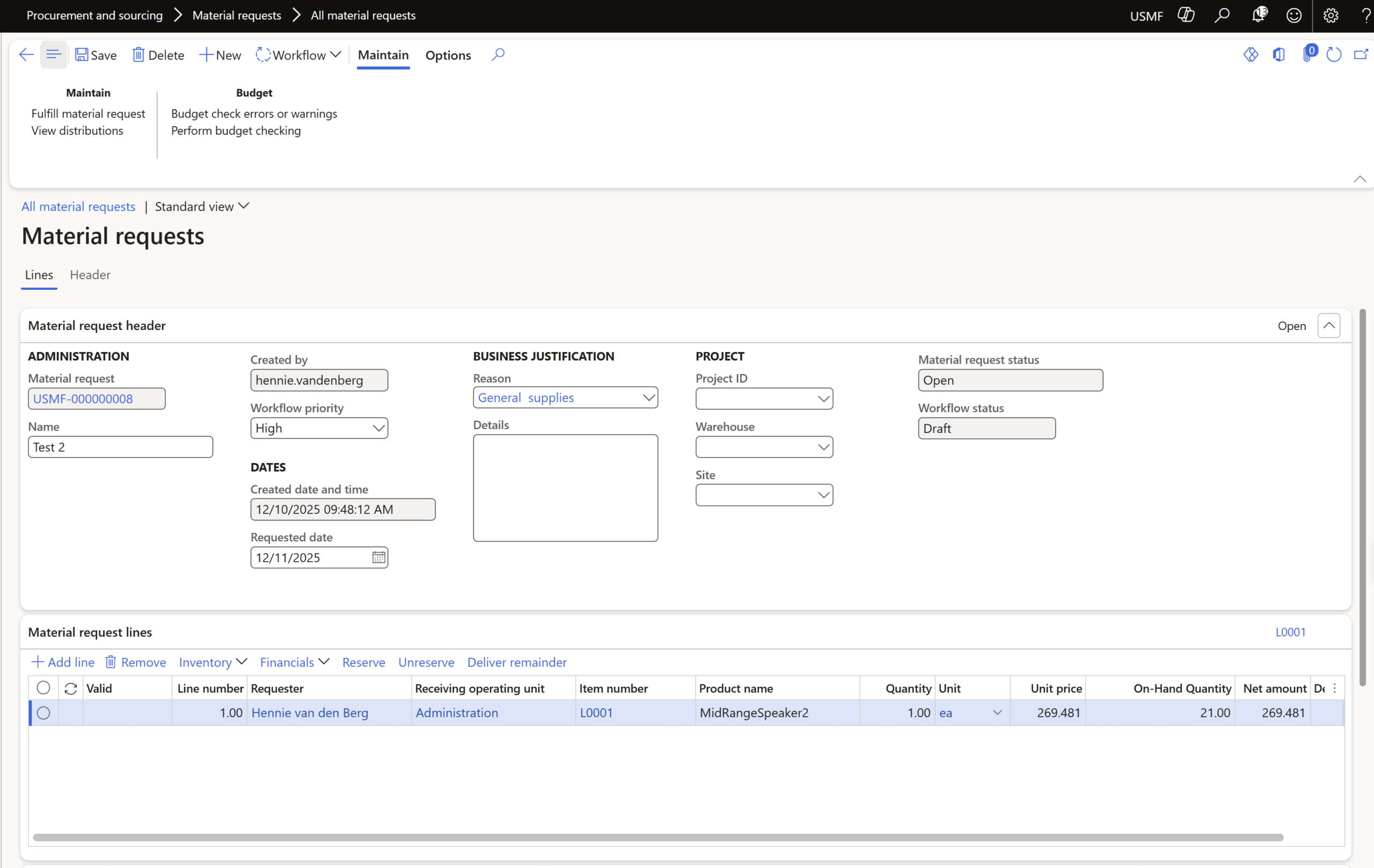
The form holds only what a site request needs: site, warehouse, required date, items, quantities, priority and the project. Engineers pick from a short catalogue of items flagged for material requests, not the whole item master. On submission, the request is checked against the project budget, so overruns are caught before any stock moves.
ONE CLICK FROM APPROVAL TO ISSUE
The warehouse issues it, D365 writes the journal
Approved requests appear in the warehouse queue automatically. The storekeeper clicks Fulfill Material Request, and D365 creates the inventory movement or project item journal with the items, quantities, warehouse and project already filled in. If only part of the stock is available, the rest stays open until it arrives.
Control from site request to project cost
Budget checked at the moment of request
Each request's estimated value is checked against the available project budget in D365 budget control. You decide what happens on an overrun: warn, block, or allow with an override.
Approvals routed by project and priority
Requests go through D365 workflow to the right project manager, and critical and standard requests can follow different paths. Every approval, rejection and comment is logged with a name and timestamp.
A complete audit trail from request to cost
The journal carries a reference to the original request, so the chain is traceable both ways: request, approval, issue, journal and ledger entry. That's your evidence in a project dispute or an audit.
One view of every request, across all sites
Procurement and operations managers see all open requests by site and status in one place. Duplicate requests stand out, and stock at one location can be redirected before anyone buys more.
How it works in Dynamics 365 F&O
1. Request from site
The engineer picks the items, sets the priority and confirms the project.
2. Check the budget
On submission, the request value is checked against the project budget: warn, block or override.
3. Approve
The right approver approves, returns, rejects or delegates through D365 workflow.
4. Issue and post
The storekeeper clicks Fulfill Material Request. D365 creates the journal and the cost lands on the project.
Key features
Request
Purpose-built form, curated item catalogue, priority per request and financial dimensions captured from the requester.
Control
Budget check at submission with warn, block or override options, and approval workflow by project and priority.
Fulfilment
Fulfill Material Request action, automatic inventory movement or project item journal, partial fulfilment and a printable issue sheet.
Visibility
All requests across sites and statuses, with a full request-to-ledger audit trail.
Security
Four roles: requester, approver, warehouse fulfilment user and manager, added alongside your existing D365 security.
Native add-on
New tables only, no changes to standard D365 tables, no middleware, and no change to requisitions, purchase orders or payables.
Frequently asked questions
Why not use the standard purchase requisition?
Purchase requisitions are built to buy from vendors and lead to a purchase order. A material request issues stock you already own and leads to an inventory journal. Using requisitions for site requests means a slow form for site teams and a manual journal for the warehouse. SysMaterialRequest handles the second flow and leaves your requisitions as they are.
Does it work with D365 budget control?
Yes. It uses the standard D365 budget control to check each material request in Dynamics 365 against the project budget when it’s submitted. You choose whether an overrun gives a warning, blocks the request or needs an override.
What happens when the warehouse doesn't have everything?
The storekeeper issues what’s available. The remaining quantity stays open on the same request and can be issued when stock arrives.
Does it change our existing D365 setup?
No. SysMaterialRequest adds its own tables, workflow type and security roles. It doesn’t modify standard tables, purchase orders, payables, your chart of accounts or posting profiles, and it needs no middleware.
Is there a separate app to install?
No. SysMaterialRequest runs inside standard Dynamics 365 F&O, with the same screens and access your users already have. There is no separate mobile app. Users can open it on any device where they can use D365 F&O, and Dynamics 365 adapts its standard layout to the screen.
See a site request go all the way to project cost
Bring one of your projects and a typical material list. In 30 minutes, we’ll show you the request, the budget check, the approval and the issue inside Dynamics 365.