
The last article covered the different project types available in Dynamics 365 F&O and how they’re used in real projects.
Every successful project starts with clear financial tracking. In Dynamics 365 F&O, that clarity comes from project categories. They organize how costs and revenue are recorded so that budgets, expenses, and results all stay in sync throughout the project lifecycle.
For teams managing multiple jobs or large-scale operations, project categories make it easier to keep budgets realistic and reporting consistent.
Let’s take a closer look at how they work, what the setup involves, and how this feature supports stronger project management overall.
What Are Project Categories in Dynamics 365 F&O?
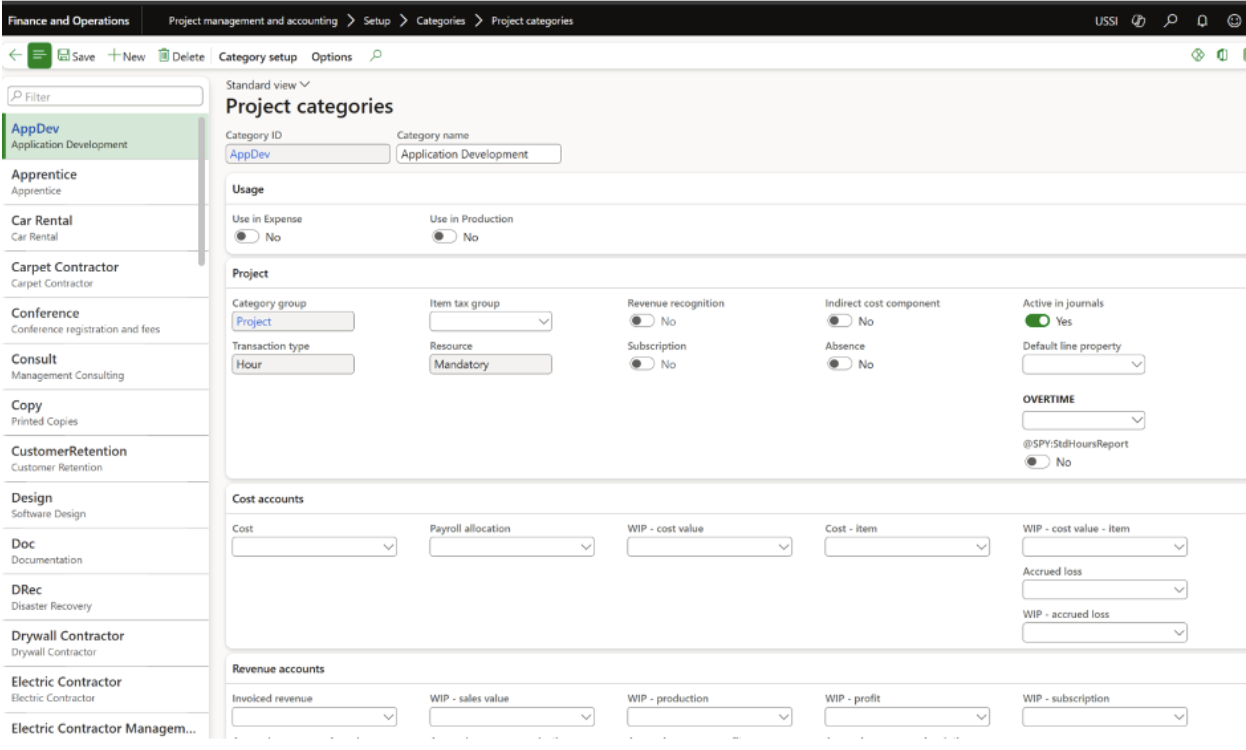
In Dynamics 365 F&O, project categories classify costs within the Work Breakdown Structure (WBS). Each category represents a specific cost type, labor, items, expenses, or fees, and links directly to project tasks for accurate financial tracking.
By assigning project categories to WBS elements, every transaction (from a timesheet entry to a material purchase) is automatically recorded under the right cost group and general ledger account. This ensures financial integrity and allows teams to monitor cost performance throughout the project lifecycle.
How Project Categories Improve Cost Control and Budget Accuracy
Every organization aims to deliver projects within scope and budget. Project categories make that possible by connecting operational data to financial outcomes.
In Dynamics 365 F&O, project categories serve several key purposes:
- Cost Classification: Categorize labor, items, expenses, and fees to provide a structured view of spending.
- Task Assignment: Ensure WBS tasks include the correct cost associations so all time and expenses are logged properly.
- Integration with Journals: Maintain consistent financial posting across project journals and the general ledger.
- Budget and Cost Tracking: Enable project managers to compare planned budgets against actual spending for better project budgeting control.
- Revenue and Expense Rules: Define revenue and cost recognition logic for precise financial reporting.
By using these categories effectively, organizations gain real-time visibility into costs and can make adjustments before small discrepancies grow into major overruns.
Category Groups
Category groups in Dynamics 365 F&O allow similar project categories to be grouped together. This grouping improves consistency in reporting and simplifies the management of related transactions.
Category groups are also responsible for defining how project transactions post from the subledger to the main account. The available transaction types include:
- Fee – for fixed-fee or milestone-based transactions.
- Hour – for labor or time-based resource costs.
- Expense – for project-related costs such as travel, lodging, or meals.
- Item – for physical goods, materials, or equipment used in a project.
Grouping categories this way helps maintain order across large-scale projects and ensures every expense flows to the correct financial accounts automatically.
Shared Categories
Shared categories make it possible to standardize project cost tracking across multiple legal entities and modules within the same system. In Dynamics 365 F&O, these categories can be used not only in Project Management and Accounting but also in modules such as Expense Management and Production.
Key benefits of using shared categories include:
- Consistency: Standard cost types across departments or subsidiaries.
- Simplified Maintenance: Updates made once are applied system-wide, reducing duplicate entries.
- Improved Reporting: Enables consolidated financial analysis across projects and entities.
- Scalability: Easily extendable to new business units or modules as the company grows.
By maintaining shared categories, organizations eliminate inconsistencies and make global financial reporting faster and more accurate.
Line Properties
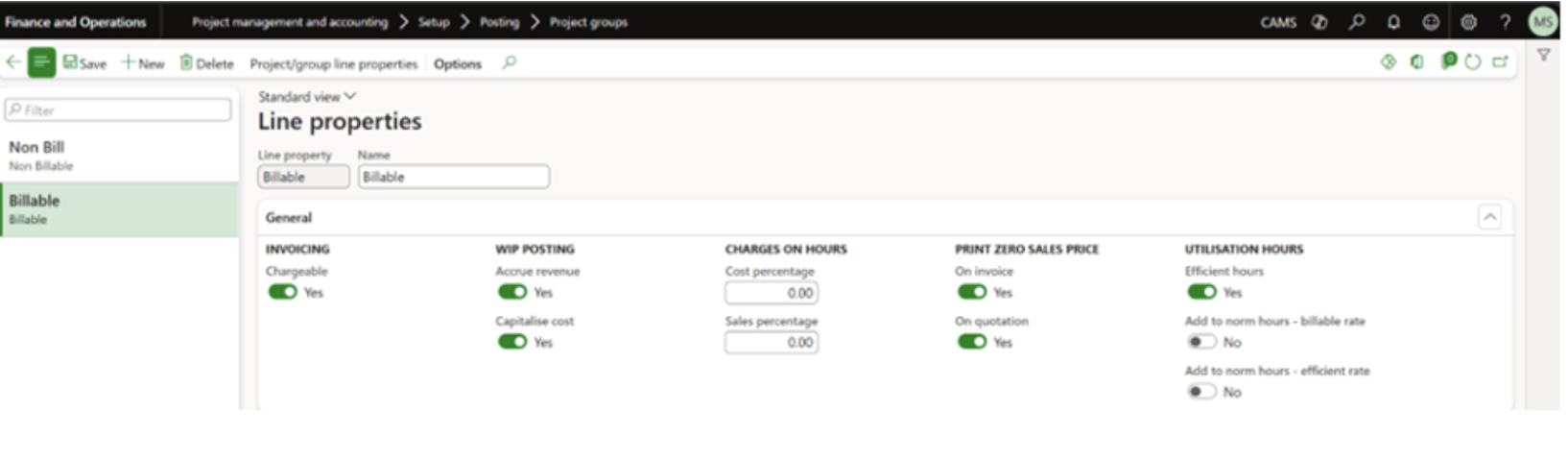
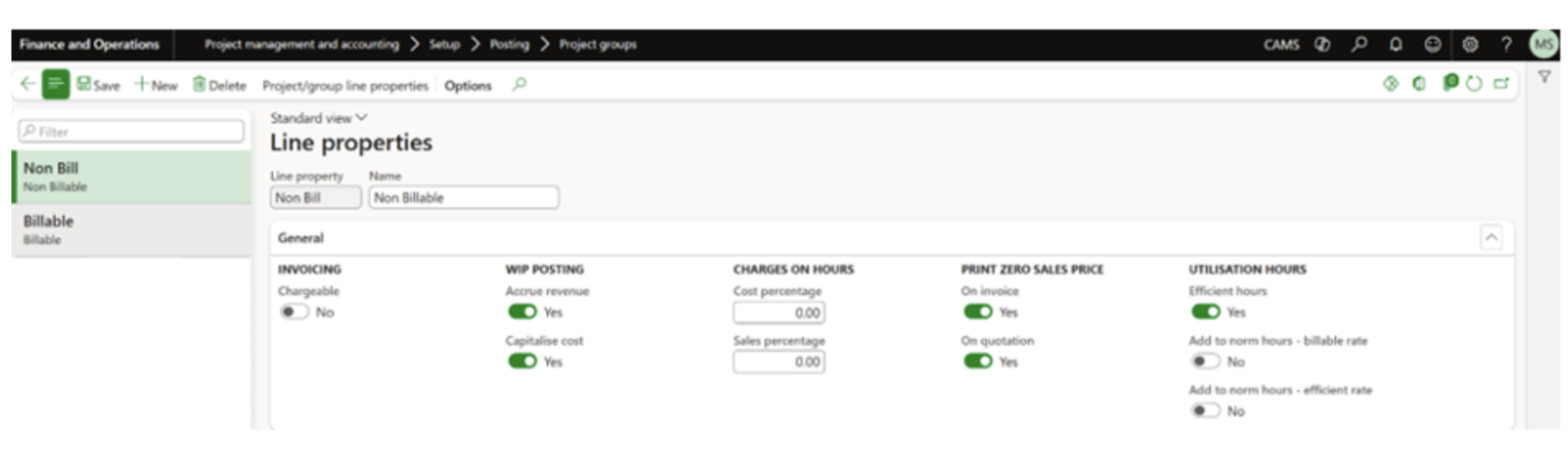
Line properties determine whether a project transaction is billable or non-billable, impacting how costs are recorded, invoiced, and recognized in financial reporting.
Billable Transactions
Costs marked as Billable are charged to the client. This setting is common in customer-facing projects such as consulting, engineering, or construction, where time, materials, and expenses are invoiced as they occur.
Non-Billable Transactions
Non-billable costs are not invoiced to the client but are still tracked as project expenses. For example, administrative work, internal meetings, or employee training may be categorized as non-billable.
In Dynamics 365 F&O, line properties can also include additional financial configurations:
- Invoicing (Chargeable): Determines whether the transaction is billable.
- WIP Posting (Accrue Revenue): Specifies if project costs should post to Work-In-Progress before invoicing.
- WIP Posting (Capitalize Cost): Indicates whether costs are treated as capital assets.
- Charges on Hours (Cost Percentage): Adds an extra cost percentage to billable hours to cover overhead.
- Charges on Hours (Sales Percentage): Adds a sales markup percentage to ensure profitability on billed work.
These options allow organizations to manage project cost control with precision, ensuring that each financial transaction aligns with both project delivery and accounting requirements.
Shared Categories
Shared categories in Dynamics 365 F&O make it easier to maintain consistent project cost tracking across multiple legal entities and modules. Instead of setting up project categories separately for each business unit, organizations can create shared definitions that apply system-wide.
These shared categories can be used across Project Management and Accounting (PMA), Expense Management, and Production modules. Administrators can enable or disable a category’s association with different modules in the Usage section, depending on where it’s needed.
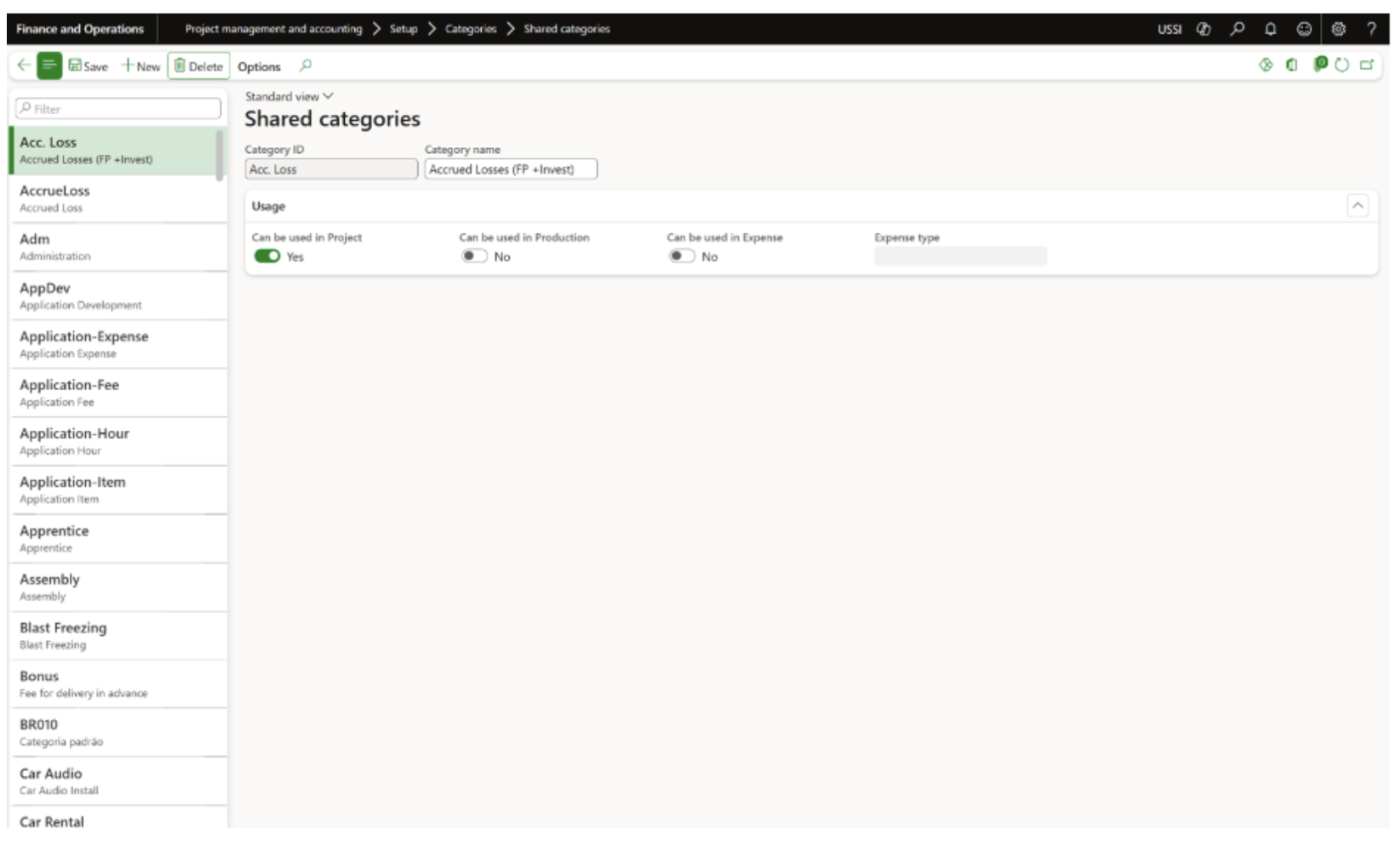
The advantages of shared categories include:
- Consistency: Establish standardized cost tracking across all entities and modules.
- Simplified Maintenance: Any updates made to a shared category automatically apply to all relevant areas, reducing duplication.
- Improved Reporting: Enables consolidated and accurate financial analysis across entities.
- Flexibility: Categories can be easily scaled or extended to new business units or modules.
- Error Reduction: Standardized setup minimizes data-entry mistakes and inconsistencies.
By centralizing category definitions, shared categories ensure smoother financial consolidation, especially for enterprises that operate across multiple regions or departments.
Category Group
In Dynamics 365 F&O, Category Groups define how transactions post from the subledger to the main ledger. They act as a bridge between project-level transactions and the organization’s financial accounts, ensuring accurate general ledger (GL) postings.
Within the Project Management and Accounting module, D365 F&O provides several predefined transaction types for Category Groups:
- Fee: Used for fixed-fee transactions and milestone-based billing.
- Hour: Used for labor and time-based transactions such as employee or contractor hours.
- Expense: Used for project-related costs such as travel, lodging, or administrative expenses.
- Item: Used for inventory or materials consumed during a project.
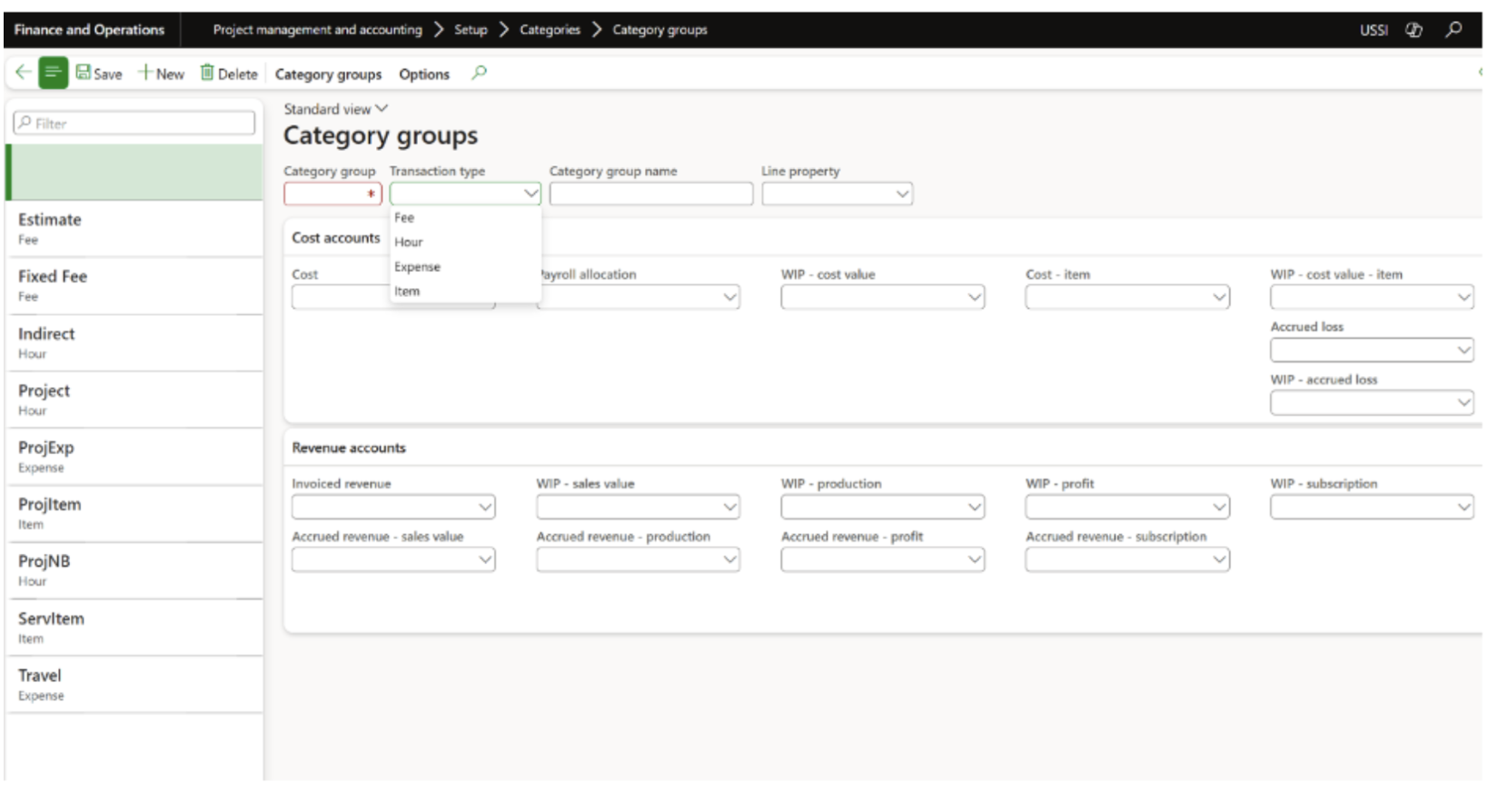
Each transaction type defines how costs and revenue move through your accounting system. By setting up category groups correctly, organizations maintain consistent and traceable financial records across all project activities.
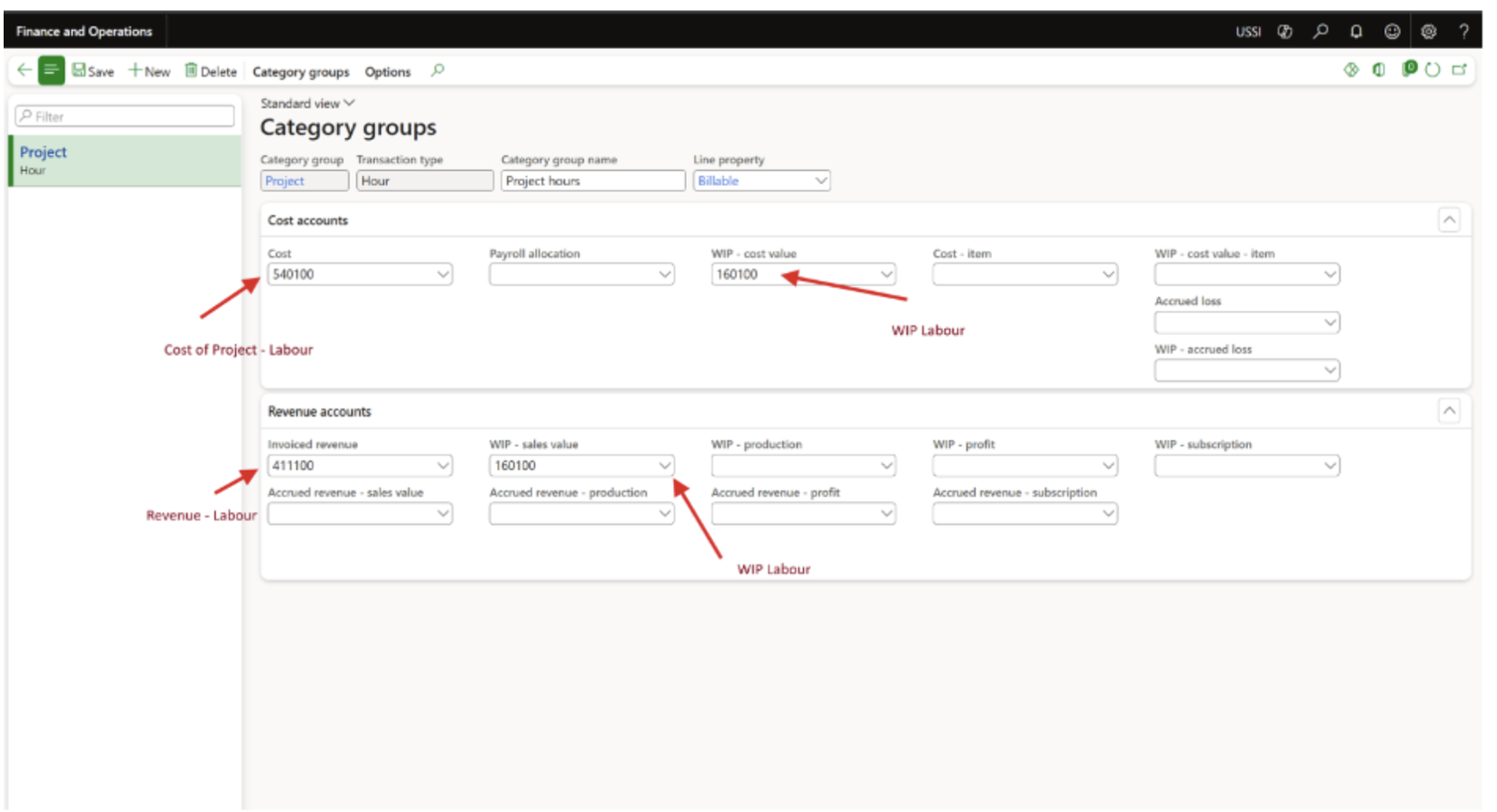
Project Recognized Cost and WIP – Cost Value
The way project costs are recognized in Dynamics 365 F&O has a direct impact on how financial results appear in reporting. The system offers two main methods for recognizing costs, each designed for different project models:
1. Cost (Immediate Recognition)
- Costs are recorded directly in the Profit and Loss (P&L) statement as soon as they occur.
- This method reduces profit immediately and provides real-time visibility into ongoing expenses.
- It’s typically used for Time and Materials (T&M) projects, where labor, materials, and expenses are billed as they’re incurred.
Example: A consulting firm performing system implementation work bills clients for hourly labor and travel expenses. These costs are recognized immediately under the Cost method.
2. WIP – Cost Value (Deferred Recognition)
- Costs are temporarily held as assets in a Work-In-Progress (WIP) account.
- They are only transferred to the P&L when the related revenue is recognized, often at project milestones or completion.
- This method ensures accurate cost-to-revenue matching and is best suited for Fixed-Price projects.
Example: A construction company building a fixed-scope facility capitalizes its costs until completion milestones are reached. Only then are expenses recognized in the P&L, maintaining alignment between work progress and revenue.
Why It Matters
In most organizations, Project Category Groups are also used to handle general ledger postings, linking operational activity to financial results. Together, Shared Categories, Category Groups, and Cost Recognition rules ensure that data flows accurately through every stage of a project.
Without these configurations, it becomes difficult to maintain accurate financial tracking, compare budgets to actuals, or ensure consistent reporting across departments.
By setting up these elements correctly in Dynamics 365 F&O, companies strengthen their project cost control, streamline financial operations, and create a single source of truth for every project transaction.
Final Thoughts
For growing businesses, structured project accounting is a necessity. Dynamics 365 F&O provides the tools to bring structure, control, and accuracy to every project through the use of project categories.
By defining cost types, managing billable properties, and linking transactions to the general ledger, organizations gain the financial clarity they need to plan ahead and make informed decisions.
At SysBrilliance, we help businesses set up and customize their Dynamics 365 project frameworks to improve cost tracking, streamline reporting, and strengthen financial performance.
Need help setting up accurate project categories and billing rules in D365? Contact SysBrilliance for expert configuration support.
Next, we move into the practical setup side and walk through how to create and manage new projects in D365 F&O.